
TL;DR

Get self-care favorites delivered free with Prime
- Fast, free delivery on millions of items
- Prime Video, Amazon Music and more included
- Member-only deals all year
Building your own AI workstation used to be cheaper, but today, prebuilt systems often match or beat DIY prices thanks to supply chain shifts. Your choice depends on control, speed, and support needs more than raw cost alone.
Imagine this: you’re ready to dive into AI projects, but now the choice isn’t so clear-cut. Should you spend weeks sourcing parts, tuning, and troubleshooting your own machine? Or should you click a button and get a ready-to-run system?
The landscape has shifted. The trusted rule — build cheaper, buy faster — no longer holds true. In fact, the current market favors prebuilt systems for many workloads. This post cuts through the hype, comparing the real trade-offs that matter: cost, control, speed, and support. You’ll learn when building makes sense and when buying is the smarter move, especially in today’s supply-constrained, price-fluctuating world.
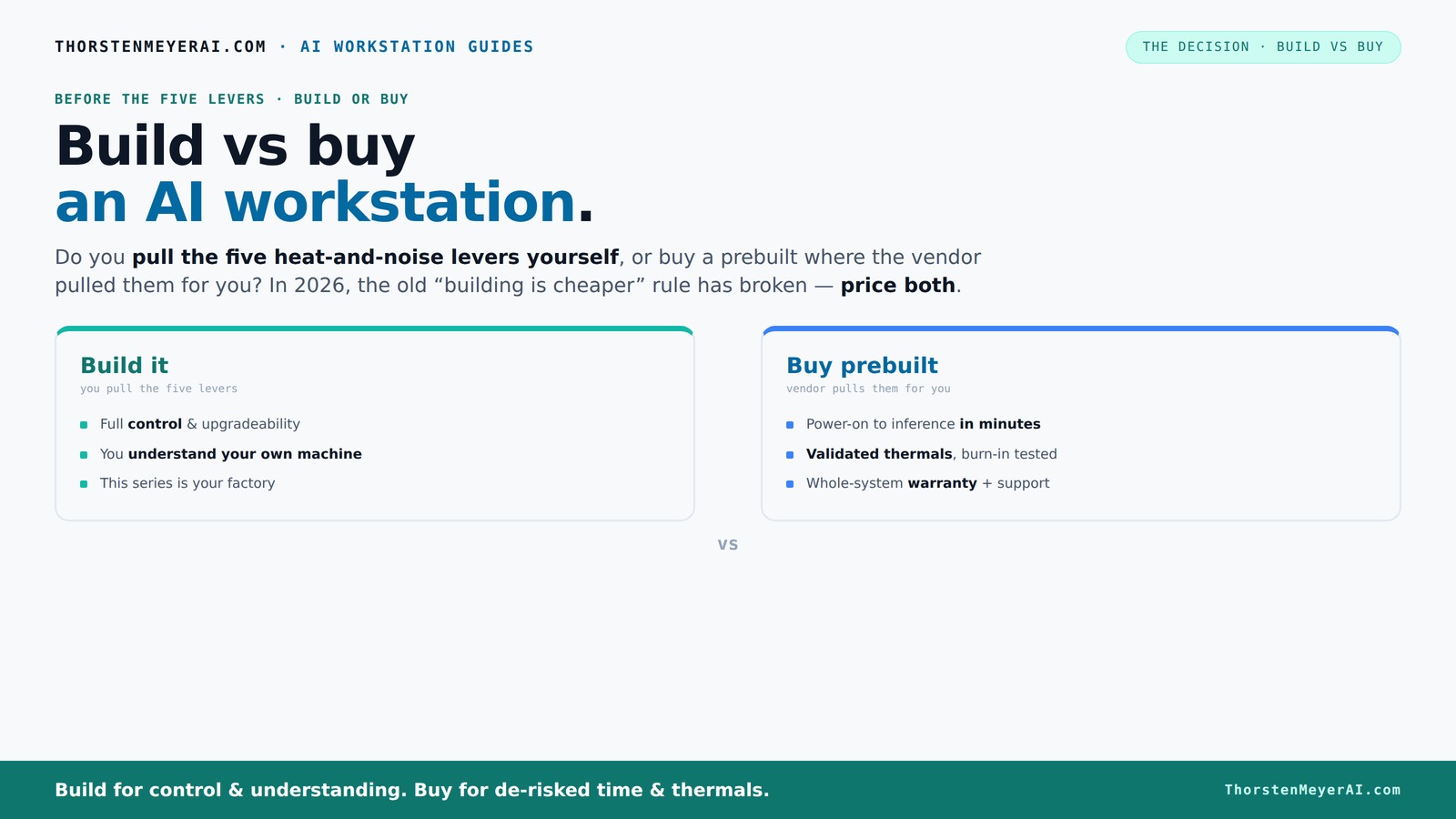
Build vs buy
an AI workstation.
The real question behind this whole series: do you pull the five heat-and-noise levers yourself, or buy a prebuilt where the vendor pulled them for you? And in 2026, the old “building is cheaper” rule has broken. Match your situation in Part 3.
Key Takeaways
- Component shortages and bulk buying have made prebuilt AI workstations often as affordable as building your own in 2026.
- Buying provides validated thermals, support, and faster deployment, reducing operational risk and downtime.
- Building offers unmatched control over hardware, cooling, and future upgrades, but demands time and technical skill.
- Total cost of ownership often favors prebuilt systems, especially when factoring in hidden costs like troubleshooting and warranty.
- Hybrid solutions—buying the base and customizing key parts—are increasingly popular for balancing speed, control, and cost.
As an affiliate, we earn on qualifying purchases.
Why 2026 Changes the Game: Building Isn’t Always Cheaper
In 2026, the old rule — build cheap, buy expensive — is dead. Supply chain disruptions and component shortages have driven up prices for GPUs, RAM, and SSDs. A DIY AI workstation that used to cost around $1,000 now easily exceeds $1,250 before you add an OS or software. This increase isn't just a minor fluctuation; it fundamentally shifts the cost calculus, making DIY less appealing from a purely financial perspective.
Meanwhile, big vendors like Lambda and BIZON bought components in bulk early, locking in lower prices and offering systems at prices that are often comparable or even lower than DIY options. This bulk purchasing not only reduces the initial investment but also allows vendors to incorporate tested, optimized configurations that ensure reliability and performance, which are critical for AI workloads.
**Implication and Tradeoff:** This market shift means that the traditional advantage of building—cost savings—has diminished. Instead, the focus shifts toward evaluating total value, including time saved, reliability, and support. For organizations or individuals with limited technical expertise, prebuilt systems now offer a compelling alternative that can reduce the risk of costly mistakes or delays.
**Practical Takeaway:** Before deciding, perform a detailed price comparison that includes hidden costs like troubleshooting time, potential component incompatibilities, and support. Consider whether your team has the capacity to manage complex builds or if the value of time saved outweighs the potential cost savings of DIY.
As an affiliate, we earn on qualifying purchases.
The Real Question: Who Pulls the Levers for Heat, Noise, and Cooling?
Building or buying isn’t just about parts — it’s about managing heat, noise, and airflow. For more on system cooling, see home theater and cooling guides. A high-power AI workstation is essentially a furnace that needs careful tuning. When you buy from a vendor, they handle all this. They burn-in test, tune fans, and often include water-cooling to keep noise and temperatures down.
For example, a Lambda system might run 30% cooler and quieter than a DIY setup, thanks to factory validation. This isn’t just about comfort; thermal management directly impacts performance and longevity. Overheating can throttle GPU performance, cause hardware failures, or reduce lifespan, which incurs hidden costs and downtime.
Conversely, when building your own, you control every thermal aspect—choosing specific coolers, airflow configurations, or even custom water-cooling loops. While this offers customization, it also requires expertise to optimize effectively. Poor thermal management can lead to thermal throttling, increased noise, or hardware failures, which undermine performance gains.
Implication and Tradeoff: Prebuilt systems offer plug-and-play reliability with validated thermals, reducing risk for critical workloads. DIY builds demand a deep understanding of thermal dynamics; missteps can negate performance benefits and increase operational costs.
Practical Takeaway: If your workload is sensitive to thermal performance or you lack the expertise, opting for a prebuilt validated system minimizes risk. If you’re technically inclined and willing to invest time, customizing thermals can eke out performance but requires careful planning and testing.
As an affiliate, we earn on qualifying purchases.
Speed vs Control: Which Matters More for Your AI Needs?
If you need to get results fast, buying often wins. Prebuilt systems from top vendors ship within a few weeks, ready with OS, drivers, and AI stacks installed. For instance, a BIZON workstation can be operational in less than a month, letting you start training or inference immediately. This rapid deployment can be crucial for research deadlines, product launches, or competitive advantage.
Building your own rig takes at least a month—sourcing parts, assembling, testing, and troubleshooting. This timeline can extend if you encounter compatibility issues or delays in parts delivery. The tradeoff is that, during this period, you gain full control over every component and configuration, enabling you to tailor the system precisely to your needs.
Implication and Tradeoff: If immediate results are essential, prebuilt solutions minimize downtime and reduce project delays. Conversely, if your project demands bespoke hardware configurations or future customization, investing time in building can pay off in the long run.
Practical Takeaway: For time-sensitive projects, prioritize prebuilt systems from reputable vendors. For long-term flexibility and tailored setups, plan and allocate time for a DIY build, ensuring you have the necessary skills or support.
As an affiliate, we earn on qualifying purchases.
Cost Breakdown: What’s Really Driving the Price Difference?
It’s tempting to think building is always cheaper — but today, that’s not a given. The upfront price of a DIY rig includes parts, but also hidden costs that can erode potential savings. These include:
- Labor to source, assemble, and troubleshoot—time is money, and mistakes can be costly.
- Time spent tuning and testing, which can delay project start dates.
- Potential incompatibilities and driver issues that require additional troubleshooting or replacement parts.
- Long-term support and warranty costs—DIY systems often lack comprehensive coverage, risking costly downtime.
Prebuilt systems bundle these costs into a single price, often including warranties that cover parts and labor for several years. This reduces the likelihood of unexpected expenses and provides peace of mind, especially for teams without deep hardware expertise.
**Implication and Tradeoff:** While initial costs might seem comparable, the total cost of ownership—factoring in support, troubleshooting, and downtime—often favors prebuilt systems. For organizations with limited technical resources, this can translate into significant savings and operational stability.
Practical Takeaway: When evaluating costs, include hidden expenses like time, support, and potential hardware failures. Use a total cost of ownership approach to make an informed decision, rather than relying solely on initial price tags.
Performance and Customization: How Much Do You Sacrifice Buying Prebuilt?
Prebuilt systems are generally “good enough” for most AI workloads—training, inference, content generation. But if your project demands highly specialized configurations—say, four GPUs with custom cooling, or specific PCIe lane arrangements—building your own offers advantages. Custom builds allow you to optimize for VRAM capacity, memory bandwidth, and form factor, which can lead to significant performance gains or operational stability during intensive tasks.
For example, a custom build can be tailored to include a high-bandwidth memory configuration or a specialized cooling system that keeps GPU temperatures lower during prolonged training sessions. This can result in hours shaved off training time or increased hardware lifespan. However, these benefits come with increased complexity and cost.
Many prebuilt options now feature high-end GPUs, ample RAM, and robust cooling solutions, making them suitable for most demanding workloads without the fuss. The key is evaluating whether your specific performance needs justify the additional effort and cost of a custom build or if off-the-shelf solutions suffice.
Implication and Tradeoff: Custom builds can provide marginal performance improvements and better hardware utilization but require more planning, technical skill, and maintenance. Prebuilt systems offer convenience and reliability for most use cases, with minimal compromise on performance.
Practical Takeaway: Analyze your workload’s specific requirements. If marginal gains translate into significant project advantages, consider investing in a custom build. Otherwise, high-end prebuilt systems are often sufficient and more cost-effective.
Upgradeability and Future-Proofing: Can Today’s Choice Grow with You?
When you build your own machine, you control upgrades. Want to swap in a faster GPU or add more RAM? It’s usually straightforward—if the case and motherboard support it. A DIY system can evolve over years, matching new AI demands and incorporating the latest hardware advancements. This flexibility can extend the system’s useful life and adapt to changing project scopes.
Prebuilt systems, however, often lock you into specific configurations. While some vendors offer upgrade paths, they are typically limited—e.g., only certain components or requiring costly service plans. If you anticipate rapid growth or frequent updates, this rigidity can become a bottleneck, forcing costly replacements or complete system overhauls.
For example, a spacious, modular case combined with a motherboard supporting multiple PCIe slots and a robust PSU makes future upgrades easier. Planning for upgradeability during initial build can save significant costs and downtime later.
Implication and Tradeoff: Building your own system provides unmatched future-proofing, especially if you select components with upgrade paths in mind. Prebuilt systems may limit this flexibility, potentially increasing long-term costs and reducing agility.
Practical Takeaway: To future-proof, choose a build with a spacious case, multiple expansion slots, and a modular design. For prebuilt systems, verify upgrade options and support before purchase to ensure compatibility with your evolving needs.
Support, Warranty, and Risk: Which Offers Peace of Mind?
Support matters. Prebuilt vendors often include warranties, on-site support, and dedicated customer service. This means that if hardware fails or encounters issues, you have a clear, reliable path to resolution, minimizing downtime and project disruptions. For example, Lambda’s 3-year parts and labor warranty covers the entire system, ensuring quick repairs and reducing operational risk.
DIY systems rely heavily on your troubleshooting skills or third-party support contracts. If something breaks unexpectedly, delays in diagnosis and repair can extend downtime, impacting project timelines. While DIY might seem cost-effective initially, the potential for longer repair times and lost productivity can offset initial savings.
Implication and Tradeoff: For mission-critical or time-sensitive projects, robust support and warranties are invaluable. They reduce risk, ensure quick recovery, and provide peace of mind. Without them, you assume more operational risk, which can be costly in the long run.
Practical Takeaway: Evaluate your project’s risk tolerance and support needs. If minimizing downtime is essential, investing in a system with comprehensive warranty and support is advisable. For less critical applications, DIY support options may suffice but come with increased operational uncertainty.
When Does Building Make Sense, and When Is Buying Better?
The decision hinges on your priorities. Building is best if you need a highly customized setup, have the time and skills, and want control over every detail. It’s also ideal for future-proofing or specialized workflows that demand specific hardware configurations.
Buying makes sense when speed, reliability, and support matter more. If you want to start crunching data tomorrow, a prebuilt system from a trusted vendor minimizes delays. It also reduces the risk of misconfiguration or hardware incompatibility, especially for those less experienced in hardware assembly.
Many organizations now adopt a hybrid approach: buy the base system and then customize key parts, such as adding additional RAM or specialized cooling. This strategy often offers a balanced solution—fast deployment with some degree of customization—tailoring hardware to specific needs without the full complexity of a custom build.
Practical Takeaway: Assess your project timeline, technical expertise, and long-term needs. Use a decision framework: if immediate deployment and support are paramount, buy. If customization and future upgrades are critical, consider building or hybrid approaches.
Frequently Asked Questions
Is it cheaper to build or buy an AI workstation in 2026?
Thanks to supply chain shifts and bulk buying, prebuilt systems often match or beat DIY prices now. It’s essential to price your specific configuration both ways before deciding.
How much performance do I lose by buying prebuilt?
Most high-end prebuilt workstations are engineered for demanding workloads, so performance loss is minimal. Custom builds might offer marginal gains for highly specialized setups.
Expect to spend time troubleshooting, sourcing parts, and tuning. You might also face compatibility issues or need to buy additional support, which adds to overall costs.
Which option is better for training large models or inference tasks?
For large models and intensive training, a prebuilt with validated cooling and power delivery reduces risk. DIY can work if you have the expertise to optimize thermals and power management.
Can a prebuilt workstation be upgraded later?
Many prebuilt options allow upgrades, but they often come with limits. Building your own system typically offers more flexibility for future growth.
Conclusion
Choosing between build and buy isn’t just about the sticker price anymore. It’s about how quickly you want results, how much control you need, and how much risk you’re willing to take. In 2026, the smarter move often depends on your project’s specific needs, not just your budget.
Imagine this: your AI workstation, humming quietly in your corner, ready to power your ideas. Whether you built it piece by piece or bought it from a trusted vendor, the goal is the same — get to work with confidence. So ask yourself: are you ready to tune every lever, or do you prefer a system that just works?
Halloween Picks
halloween
As an affiliate, we earn on qualifying purchases.